MVC in WordPress: The Pattern Everyone Learns, Few Truly Apply
📌 Originally published on 4wp.dev → MVC Pattern in WordPress. Long read on LinkedIn: MVC in WordPress: the pattern everyone learns, few truly apply.
Every WordPress developer has heard of MVC. Very few plugins actually follow it.
https://www.youtube.com/watch?v=C2DnJEmbk4A
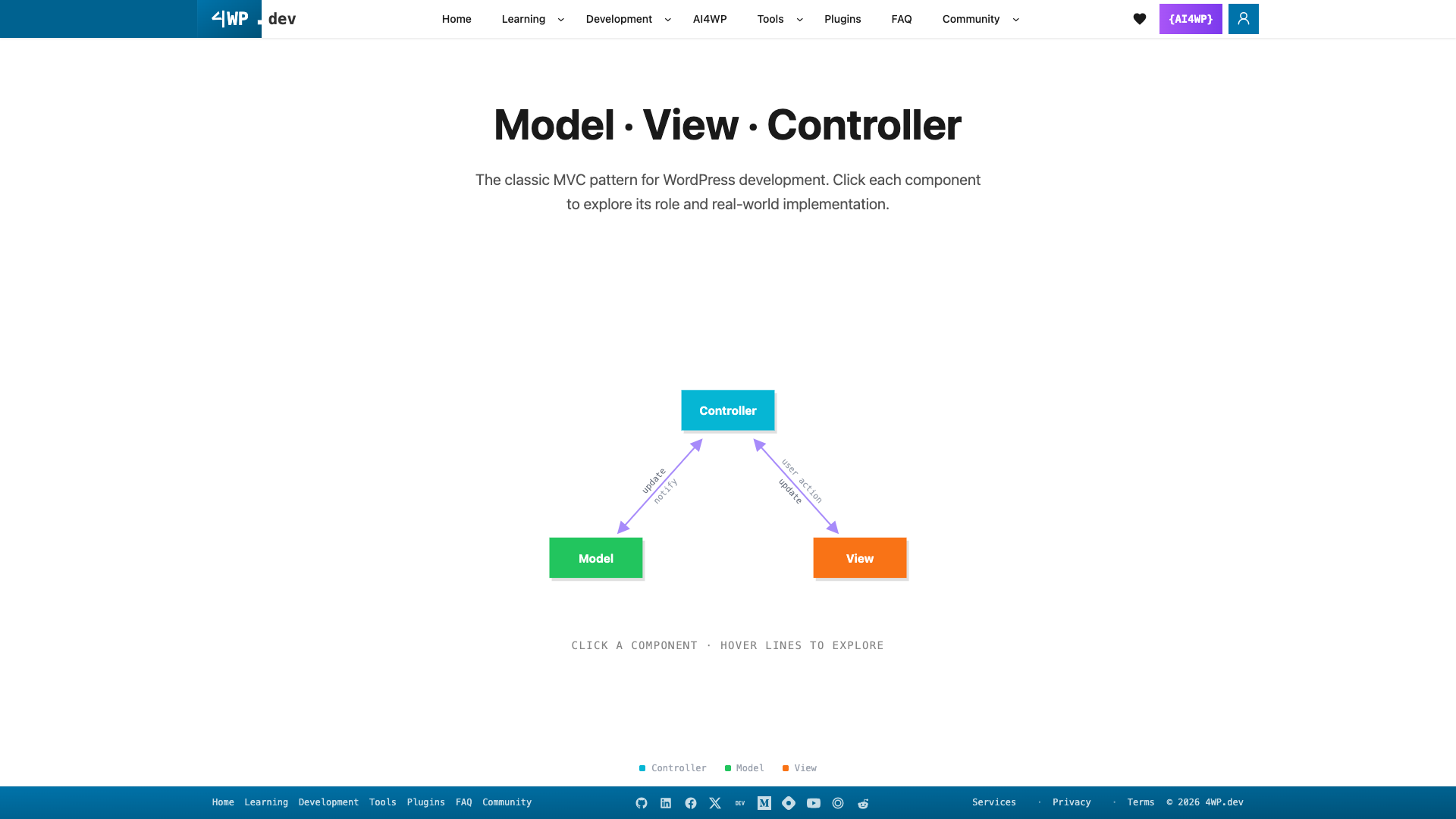
WordPress isn't an MVC framework — but its building blocks map cleanly onto Model · View · Controller once you know where to look.
👉 Interactive diagram with all examples: 4wp.dev/architectures/mvc
1. Controller — the traffic director
Receives the request, validates it, calls the Model, picks the View. No SQL. No HTML.
In WordPress, Controllers are:
// Controller — REST endpoint
register_rest_route( 'myplugin/v1', '/products', [
    'methods'             => 'GET',
    'permission_callback' => fn() => current_user_can( 'read' ),
    'callback'            => function ( WP_REST_Request $req ) {
        $products = get_all_products( $req->get_param( 'category' ) ); // → Model
        return rest_ensure_response( $products );
    },
] );
➡️ More Controller examples (hooks, AJAX): 4wp.dev/architectures/mvc/#mvc-detail-controller
2. Model — the data layer
Owns data and business rules. Returns clean data. Never renders HTML.
In WordPress, Models are:
Custom Post Types, taxonomies, registered meta (schema)
$wpdbdata-access functions/classesOptions API settings classes
// Model — the only layer that touches options
class PluginSettings {
    private const KEY = 'myplugin_settings';

    public static function get( string $key, $default = null ) {
        return ( get_option( self::KEY, [] ) )[ $key ] ?? $default;
    }
}
➡️ CPT schema and $wpdb examples: 4wp.dev/architectures/mvc/#mvc-detail-model
3. View — the presentation layer
Renders data it receives. No queries. No business logic.
In WordPress, Views are:
theme templates (
single.php,archive.php)shortcode output
Gutenberg block
save()/ render templates
<!-- View — escape, display, nothing else -->
<article class="product">
    <h1><?php echo esc_html( $product['title'] ); ?></h1>
    <p class="price"><?php echo esc_html( $product['price'] ); ?></p>
</article>
➡️ Shortcode and block examples: 4wp.dev/architectures/mvc/#mvc-detail-view
4. Real plugin: 4WP Weather
4WP Weather (GitHub) is built along the same lines:
| Layer | In the plugin |
|---|---|
| Controller | REST route forwp-weather/v1/weather — the block calls it, PHP does the remote request |
| Model | Provider (OpenWeatherMap), API key in Options API, transient cache |
| View | Gutenberg block with Small / Compact / Advanced templates |
Result: the API key never reaches the browser, cache lives in one place, and the block only renders.
Another example of the 4WP approach: 4WP SEO Helper (GitHub).
5. Quick checklist
[ ] Controllers are thin: validate → call Model → return/render
[ ] Only the Model touches
$wpdb, options, meta[ ] Views contain only escaping and markup
[ ] Nonces and capability checks live in the Controller
[ ] Templates never call
WP_Querydirectly
Go deeper
Written by Anatoliy Dovgun · 4wp.dev — FSE WordPress development. Follow: GitHub · X · DEV · Medium · Hashnode · YouTube